Offer Comparison
All Offers in View so You Don’t Overpay
With POCASIO’s offer comparison, you can directly compare several offers. This allows you to immediately identify price differences, scopes of services and conditions – and make informed decisions instead of expensive gut feelings.

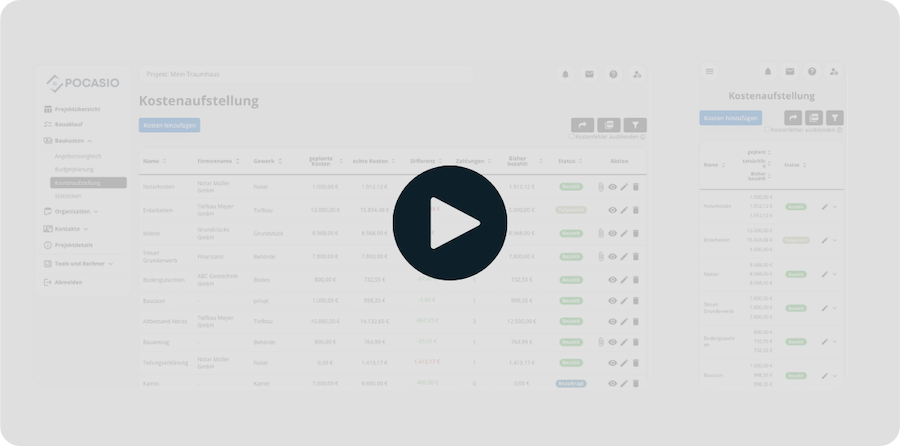
Without a Clear Comparison, You’ll Quickly Pay Extra!
Many builders opt for the first or supposedly cheapest offer – and only realize later that services are missing or costs are hidden. Without a clear overview, you can quickly lose track and risk paying too much or making the wrong decision.

Prices hardly comparable
Each provider calculates differently: Sometimes positions are missing, sometimes services are hidden. This makes a real comparison almost impossible.
Lack of overview
What is really included in the price? Without a clear comparison, you can quickly overlook differences in the scope of services.
Expensive wrong decisions
Those who sign blindly often pay more in the end – be it through supplements, missing services or poor conditions.So that You Can Compare Offers Fairly and Make the Right Choice!
With POCASIO’s offer comparison, you can see all offers clearly side by side – prices, services and conditions at a glance. Differences become immediately visible, so you can make informed decisions and save real money.
All Offers – Neatly Sorted in one Place
Never again confusing e-mail chains: In POCASIO, you create an offer comparison for each relevant construction service and enter all received offers there. POCASIO clearly shows you which company charges how much.
So that you can make the best decision without losing track!
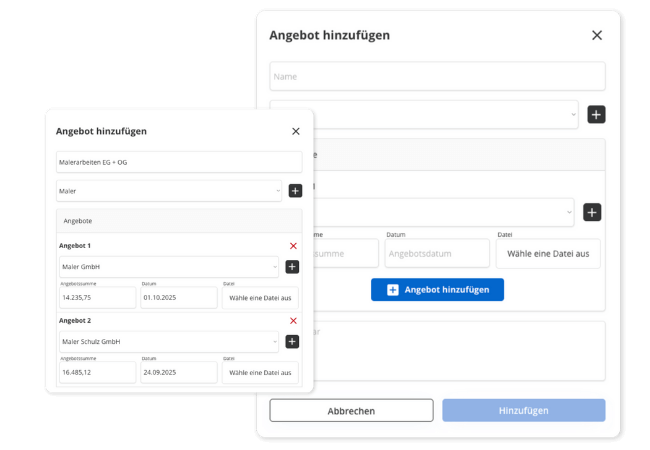
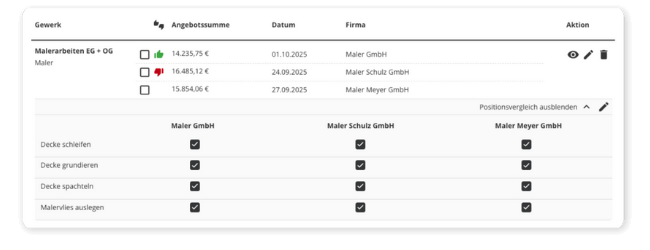
Clearly See who Offers the Best Price
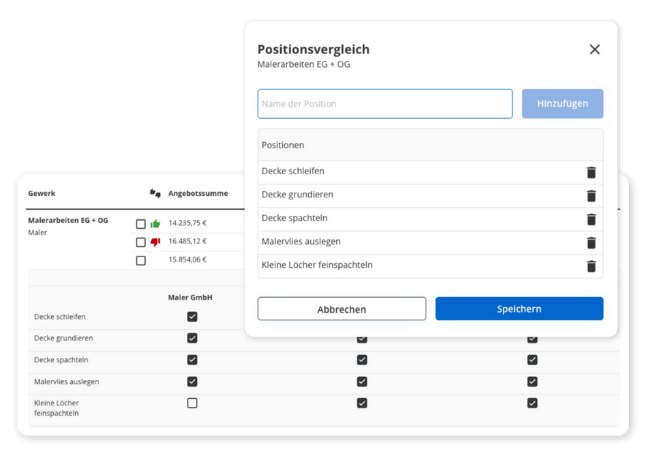
Which offer is the most expensive? Where can you save? POCASIO automatically highlights the most expensive and the cheapest offer. If you want, you can even start a position comparison and see where there are differences in services. This way you can see at a glance where hidden costs lurk.
So that you don’t just decide based on gut feeling, but with a clear view of price and performance!
From the Offer Directly into the Cost Breakdown
Have you made a decision? Then you can transfer the respective offer directly into your construction cost breakdown – without manual transfer. POCASIO automatically enters company, trade, planned sum and comment.
So that your budget is always right – without double work and number salad!

But that’s not all!
In addition to these functions, POCASIO offers you many other extras that make the offer comparison even easier. Whether multiple offers per trade, automatic position comparison or the direct transfer into your construction cost breakdown – this way you make your decision not only faster, but also safer.
Store multiple offers per trade
Whether two or five offers – record them all in one place and keep track of the created comparisons at all times.Store documents and PDF offers
Save PDF offers, notes or special features directly with the respective offer – for you or for later clarification with the company.History of your comparisons are retained
Keep track of completed comparisons and decisions made so you never lose track.Notes for comparison and negotiation
Store important information on special features, queries or price negotiations so that nothing escapes you when making a decision and you still know weeks later what you wanted to pay attention to.Export and share offer comparison
Export your offer overview as a PDF and share it with partners or consultants. This way you can make decisions together. Or simply file it for your documents.Also mobile on the construction site
Whether on the construction site, during a telephone call with the craftsman or in the evening on the laptop – POCASIO works on all devices and is therefore the perfect companion for your project.In 3 steps to the right decision
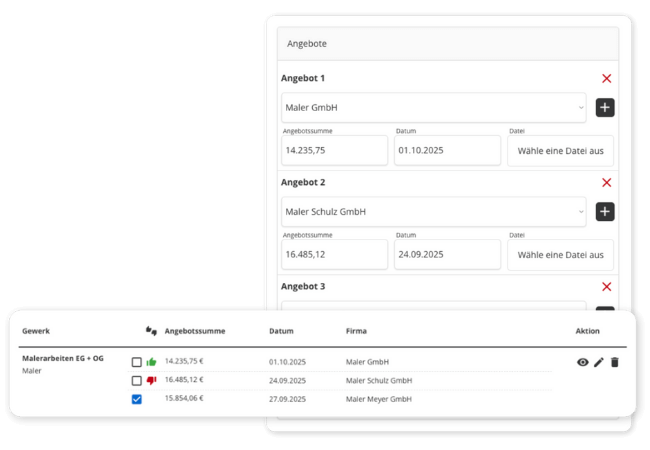
Enter all received offers for a construction service directly into POCASIO. This way they are collected in one place – without e-mail chaos and paper clutter.
In 3 steps to the right decision
Compare prices, services and conditions at a glance. With the position comparison, you can immediately see where gaps exist or costs are hidden.
In 3 steps to the right decision
Select the appropriate offer and transfer it to your construction cost breakdown with one click. This keeps your budget up to date – without double the effort.


With POCASIO You Compare Clearly – Instead of Sinking into the Offer Chaos
Without a structured offer comparison, you often decide based on gut feeling and risk paying too much or overlooking services. POCASIO shows you all offers transparently side by side – for fair comparisons and safe decisions.
POCASIO in Comparison


Record all offers centrally
Prices and services side by side
Cheapest & most expensive offer immediately visible
Position comparison at detail level
Store documents & notes on offers
Share project with partner and have joint access
Many other functions such as budget planning, construction diary, checklists, construction process and much more to be the perfect companion for your construction project
Thousands of users. A tool for every construction project.
Whether it’s a single-family or semi-detached house, an apartment building or residential building, a single apartment, hotel, or restaurant: POCASIO helps to implement construction and renovation projects in a less stressful, clearer, and more cost-effective manner.

Start your Own Construction Project for Free Now.
With POCASIO, you can organize your construction or renovation project in one place and always have all the information in your pocket!
Frequently Asked Questions
Here you can find out what other builders, renovators, and project managers wanted to know before starting with POCASIO.
POCASIO is a digital project management software specifically for builders. It helps you keep construction costs under control, plan the construction process in a structured way, and centrally organize all important documents and tasks.
POCASIO is aimed at (private) builders who are building a new house or carrying out a major renovation. Whether you are building for the first time or already have experience – the solution gives you structure and security at every step.
Not at all. POCASIO is designed so that even first-time builders without prior experience can get started immediately – with clear structures and simple tools.
Because offers often differ greatly – not only in price, but also in the scope of services. With POCASIO you can immediately see where differences or gaps are.
Yes. Whether two, five or ten offers – you can record and manage them all in POCASIO in one place.
Yes. POCASIO automatically highlights the cheapest and most expensive offer. You can also start a line-item comparison to see details side by side.
Of course. Upload the original offers, add comments or mark special features all directly with the respective offer.
With one click you transfer the selected offer into your construction cost breakdown. All data is entered automatically.
Yes. With just one click, you can export the contents as a clear PDF. So you have your data at hand at any time – for saving, printing or passing on to third parties.
POCASIO has a free basic version that allows you to work great during the planning phase. When your construction phase begins and you want to record payments, for example, you can do this with the Plus license. The good thing is: thanks to the free license, you’ll know by then if POCASIO is the right solution to accompany you until the end of your project.
POCASIO Plus is available as a monthly and annual subscription. Alternatively, you can purchase a one-time license if you do not want ongoing subscription payments. You can find the current prices on our Prices page.
Yes, of course! POCASIO is web-based and automatically adapts to the screen size of your laptop, tablet, or smartphone. Additionally, there are apps for iOS and Android in both app stores. This way, you always have access to your project, even on the construction site or on the go.
Yes, you can share your project with other people. For example, your construction partner, energy consultant, architect, or construction expert will always have insight into the construction progress, documents, and costs – without cumbersome Excel lists and back-and-forth emails.
Then simply try it out for free! And if it’s not for you, you can delete your account at any time via your profile settings. And perhaps you could even let us know what you felt was missing, so that we can make POCASIO even better!